Seats.io becomes more accessible
Seats.io now ships a fully keyboard-navigable, screen-reader-friendly way to choose a seat.
Everything we ship, from new features to small fixes.
Reduced contrast of stepped foundations to improve their appearance.
Shapes that block seats will now become semi-transparent to retain visibility.
Seat tooltips now also show when you hover a seat with the rectangle or lasso selection tool, so you can check a seat's details without switching back to selecting single seats.
Error messages in the designer now show up next to what caused them, instead of in a browser popup.
The chart scanner now finds the seats on your reference chart by itself and starts scanning as soon as you open it. You no longer need to zoom in and click a seat first. If you click a seat to add a seat style the scanner missed, it now uses that seat's size at any zoom level.
The chart scanner is faster, especially on large reference charts. It finds the same seats and rows as before.
Stepped foundations now get realistic riser heights.
Fixed an issue in stepThrough where a section whose rows have no labels showed up as a single "?" row.
Fixed an issue where the view from seat preview in the seat popover of 3D charts looked blurry, especially sponsor logos and text on the pitch. On high-resolution screens, the preview is now as sharp as the chart around it.
In the 3D view from seat, billboards far away from the seat no longer get cut off. Previously, from a seat at the back of a large venue, a billboard on the far side could be missing from the seat's preview.
Fixed an issue with the new renderer UI where sections and seats right under the empty part of the filter bar couldn't be hovered or clicked.
Fixed an issue where seats sank into a sloped foundation whose front edge has a notch.
Foundations in the designer can now be stepped: instead of a smooth slope, they rise in treads, and rows snap to the front of each tread while you draw them.
You can now use objectIcon in the create order and edit order modes of the event manager.
Seats.io now ships a fully keyboard-navigable, screen-reader-friendly way to choose a seat.
Also shipped
Fixed an issue where changing the category of a general admission area in the event manager only applied to the places of that area that are not assigned to a channel. Places assigned to a channel now show the area's new category too.
Image upload errors in the designer now show under the upload box that failed instead of in a browser popup.
Fixed an issue where the designer showed no message when an image upload failed.
Fixed an issue where changing the category of a general admission area on an event did not apply to the places of that area assigned to a channel. Those places now follow the new category too, so for example marking that category as not for sale also makes them not for sale.
Added a new superStrict mode to the orphan seats selection validator. It warns ticket buyers whenever their selection leaves a single empty seat next to it, including when that seat couldn't have been avoided.
Fixed an issue where updating or removing a channel failed when one of the channels had area places for a general admission area that is no longer on the chart.
Fixed an issue where assigning places of a general admission area inside a section to a channel did not work: the places did not end up in the channel, and booking or holding them failed.
You can now change the colors of a playing field in the designer. This works for basketball, volleyball, handball, korfball, field hockey, padel, hard-court tennis and squash. Pick a color for each part of the field, such as the court or the area outside it, and it shows in the 2D and 3D renderers.
zoomToObjects, zoomToSelectedObjects and zoomToSection now show all floors in the 2D renderer when the objects are on different floors, instead of failing.
Added a korfball field to the playing fields in the designer.
Added a new objectPopover.showEntrance setting to show an object's entrance in the popover.
Added a new groundColor setting to allow custom ground color for 3D charts.
Places on the other floors in the 3D renderer now look unavailable when lockActiveFloor is set.
Fixed an issue where the 3D preview camera in the designer could accumulate rotation and spin multiple times when reset.
Stadium and arena charts can now have a real playing field at their centre. Pick a sport, place it on your floor plan, and the designer draws the pitch, court or rink at its true size, so it lines up with your stands. Ticket buyers see it on the chart and in the 3D view.
Also shipped
Improved goToFloor in the 3D renderer to focus the view on the floor, also on venues where floors don't overlap.
Fixed an issue on 3D charts with multiple floors where seats, tables and general admission areas under a higher floor showed no selection marker once selected. They now keep their marker, shown on top of the floor above them.
Added an ignoreResale option to the noOrphanSeats selection validator. When it's set, an empty seat next to a resale seat of the same category is no longer considered an orphan. Handy when resale seats are sold one by one, or when the price difference doesn't matter. See the docs.
Retrieving a chart with expand=events is now much faster for charts with many events. The response includes at most the 10,000 most recently created events; numTotalEvents still holds the total.
Improved visual quality of 3D billboard images
You can now get the changelog by email. Every two weeks, we send you one email with all changes to seats.io in that time: new features, improvements and bug fixes.
How to subscribe:
1. Go to your user settings.
2. Under Product update emails, set Send me a digest of all changes, every two weeks to Yes.
To stop the emails, set it back to No.
You can now page through all events of a chart, newest first, up to 100 per page. See List events for a chart for the API call and the methods in our server-side SDKs.
Improved how zoomToObjects, zoomToSection and zoomToFilteredCategories frame objects in the 3D renderer, so they are shown in full and as large as possible.
Fixed an issue where the 3D View From Seat bar labelled table seats with "Row" instead of "Table".
3D charts now support billboards with up to 12 scrolling images - ideal for sponsorships or advertisements. Setting these up in the designer is straightforward once you have converted your chart to 3D.
Also shipped
Improved 3D navigation for small venues with no slanted foundations.
Fixed an issue where the first tap after deselecting a seat did nothing on touch devices when numberOfPlacesToSelect was set.
Fixed an issue where the ticket type popover didn't open for a select-as-group listing when multiSelectEnabled was set.
Fixed an issue where a select-as-group listing priced with ticket types could not be selected through a custom onPlacesWithTicketTypesPrompt. Confirming the prompt now selects every seat in the listing, each with the ticket type chosen for it.
When you create or update a workspace through the API, you can now also set its for sale mode: rate limited or unlimited. No need to change the workspace setting separately afterwards anymore.
3D renderer now supports multi-floor navigation on venues where floors cover interactive objects, allowing users to reveal the objects underneath a floor and jump through each floor.
Floors in a 3D venue in the designer now push the contents of the floor above.
Shapes and Foundations can now have negative starting height to allow sinking below the current floor.
The Monitoring page now shows how many concurrent requests you made in the past, not just right now, and whether any of those hit a 429 Rate Limit Exceeded. Pick the last hour, 24 hours or 7 days, and step back in time with the previous and next buttons. We keep up to 30 days of history.
Also shipped
In 3D, tables you book as a whole, general admission tables and tables with variable occupancy now show people on their chairs, just like tables you book by seat. Selected places get a white figure and booked places a grey one, so you can see at a glance how full a table is. Tables that can't be selected show grey figures on every chair.
Less whitespace in dialogs in the new renderer UI
maxSelectedObjects no longer accepts negative numbers.
Fixed an issue where choosing a ticket type added to the selection instead of replacing it when numberOfPlacesToSelect was set.
Fixed an issue where doSelectObjects couldn't select whole tables when numberOfPlacesToSelect was set.
Fixed an issue where multi-select only selected one seat of a select-as-group listing.
Fixed an issue where selecting a seat with a ticket type crashed when its category had no maxSelectedObjects entry.
Fixed an issue where pricing.prices rejected primary on category ticket types.
On charts with multiple floors, price markers now only show for the floor you are looking at, and appear once that floor has finished coming into view. Previously, markers from other floors could show up on top of it. The all-floors overview no longer shows price markers, because they could not be placed accurately on the stacked floors.
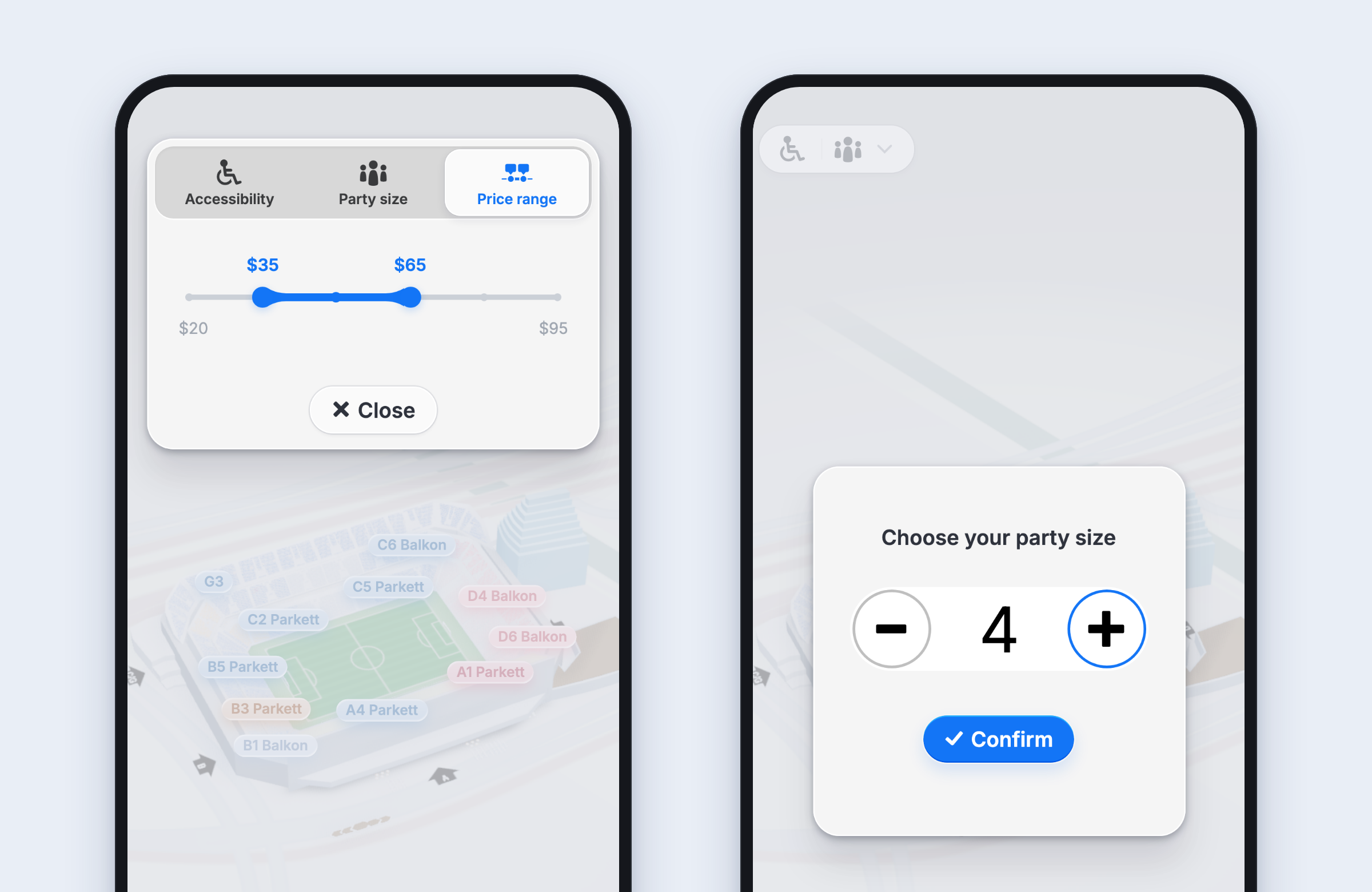
Today we are releasing new filterControls config and partySize that allow your users to more easily find the seats that match their needs. Included in the new filterControls is a completely new price filter.
Party Size is a new way for users to interact with the chart and find seats quickly and easily.
In seasons that don't propagate their for sale configuration to their events, seats that are marked not for sale on an event can now be resold. Once such a seat is put up for resale, buyers can select, hold and book it, both in the seating chart and through the API. Not for sale seats that aren't up for resale stay unavailable.
In 3D, shapes now show a marker for every label type, like entrances, bars, cafés and restrooms, not just the stage. Shapes with a label but no label type show their label too. Long labels are shortened so markers stay compact.
Fixed an issue where best available requests could occasionally fail when several requests for different categories of the same event came in at the same time. In some cases, seats picked by a failed request could also stay unavailable for a short while afterwards.
Big charts without sections are now much faster to work with in the chart designer. Loading, zooming, drawing, undo and redo, and selecting lots of rows at once are all noticeably quicker on charts with tens of thousands of seats.
Non-selectable 3D objects that belong to a table (seats where the table itself is booked and vice-versa) will now have a colour similar to either the foundation it resides on, or the ground.
Fixed an issue where the event manager could show a negative number of available places for a general admission area in a season, when places were booked on one event and marked as not for sale on another. Available places are now counted per event in the season.
All filters can now be used in create order and edit order mode
Tables can no longer be given more seats than fit around them. The number of seats is limited by the table's size, and a table can't be made smaller than its seats need.
Fixed an issue where shadows in 3D previews didn't update when objects were redrawn.
Fixed an issue where the 3D selection indicator would animate between seats when it shouldn't.
Labels can be made visible for joined areas
Ticket type definitions could have duplicate ticketType ids. We now show a warning if duplicates are detected.
Fixed an issue where the ticket listing React component could have non-unique keys
Fixed an issue where 3D tables aren't placed correctly when not on the first floor.
Added support for 3D tables.
Added filters support.
Made calls to manage channels and for sale configs faster for seasons with many partial seasons
filteredCategories has been deprecated. Use filters.categories instead.
Fixed an issue where the endpoint to remove ticket buyer IDs (DELETE /ticket-buyers) returned a 404.
Fixed an issue where saving a chart could fail if its background image had not loaded yet
New table type: "General Admission". You need to enable the feature flag first.
Bug fix for "seasons and events not for sale config cannot overlap" error when marking places in an area as not for sale in a season (in some circumstances)
Slightly curved rows get a proper foundation in 3D charts
Areas on top of curved foundations are rendered correctly in 3D
Switching from 2D to 3D (or vice versa) while in full screen mode does not lock you in that mode
Fixed an issue where 3D View From Seat wasn't working on public preview links.
Fixed an issue where the chart failed to load when a ticket type in the pricing config had unavailable or unavailableReason.
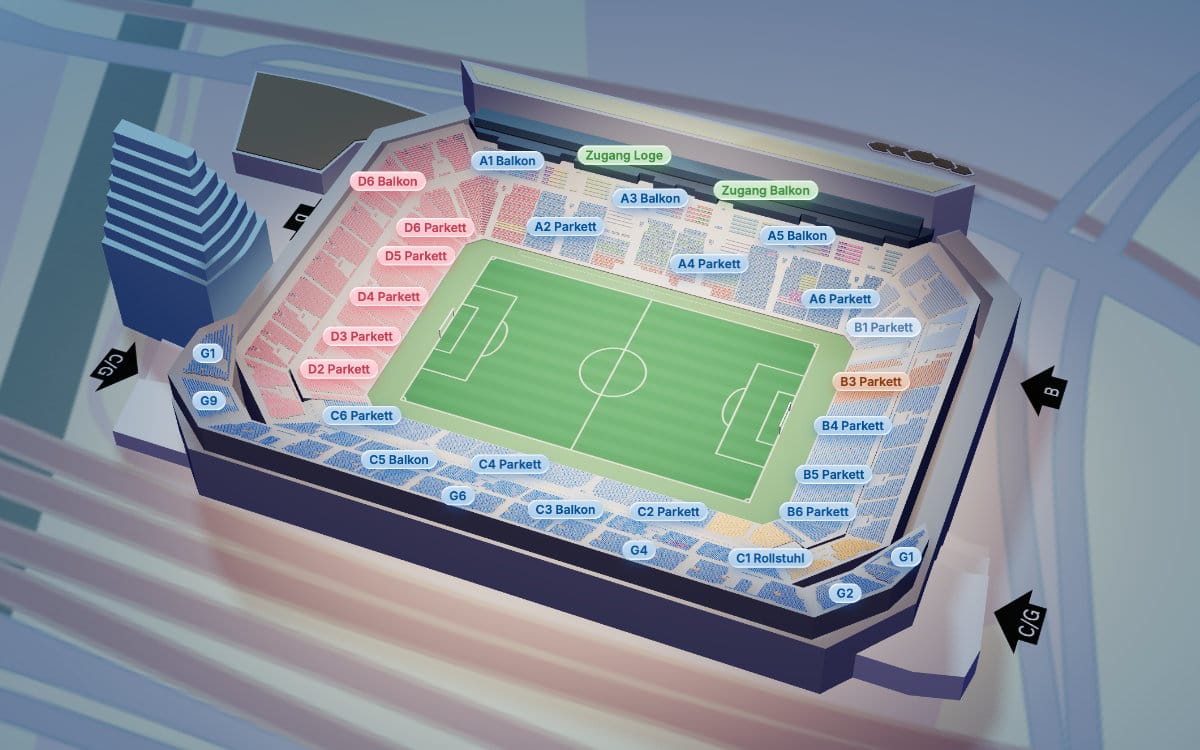
Deliver a more immersive seat-picking experience. In minutes.
Also shipped
You can now design and render 3D charts. To do this, enable the feature flag first.
Seat can be listed as resale, even if it's not for sale
Fixed an issue where Ticket Buyer ID validation was not enforced when it was enabled at workspace level.
In static mode, no popover gets shown when tapping on mobile and onObjectClicked is passed in
Added endpoint to mark all objects as not for sale.
Removed multiSelect for touch devices
The scope of bookings in season-related reports can now be controlled with seasonBookingsPropagated
Ability to mark seats as aisle seats.
Calls to list workspaces were slow for customers with many workspaces. Now they're fast again.
Empty section and area labels are not allowed anymore. We replace them by '?' automatically.
Fixed an issue where onHoldSucceeded reported the same ticket type for every held place of a general admission area, instead of the ticket type of each place. selectedTicketType is now also present on the objects passed to onHoldFailed and onReleaseHoldFailed. We're rolling this out gradually over the coming weeks — get in touch if you'd like it enabled sooner for your account.